

SpringCloud笔记
OpenFeign
远程调用
调用注册中心服务
<dependency>
    <groupId>org.springframework.cloud</groupId>
    <artifactId>spring-cloud-starter-openfeign</artifactId>
</dependency>
使用步骤
1.使用@EnableFeignClients标注启动类
@EnableFeignClients
@EnableDiscoveryClient
@SpringBootApplication
public class OrderMainApplication {
    public static void main(String[] args) {
        SpringApplication.run(OrderMainApplication.class, args);
    }
2.创建接口,标注需要发送到的服务名称,构造发送的路径以及参数
@FeignClient(value = "service-product")
public interface ProductFeignClient {

    @GetMapping("/product/{id}")
    public Product getProducts(@PathVariable int id);
}
3.自动注入ProductFeignClient,注入后即可调用接口方法(自动负载均衡)
@Autowired
ProductFeignClient productFeignClient;远程调用远程API‘
将我们的调用地址该表为目标文档对应地址,以及按要求设置请求参数即可
@FeignClient(value = "weather-client", url = "http://www.xxx.com")
public interface WeatherFeignClient {
    @PostMapping("/weather/condition")
    String getWeatherCondition(@RequestHeader String auth,
                               @RequestParam String token,
                               @RequestParam String cityId);
}
输出日志
获取远程调用的Debug信息
logging:
  level:
    com.nwpu.order.feign: debug
import feign.Logger;
import org.springframework.context.annotation.Bean;
import org.springframework.context.annotation.Configuration;
@Configuration
public class FullConfiguration {
@Bean
Logger.Level fullLevel() {
return Logger.Level.FULL;
}
}日志结果
2025-10-14T16:03:52.718+08:00 DEBUG 28172 --- [service-order] [nio-8000-exec-1] c.nwpu.order.feign.ProductFeignClient    : [ProductFeignClient#getProducts] {"id":2,"name":"电视","price":201.2}
2025-10-14T16:03:52.718+08:00 DEBUG 28172 --- [service-order] [nio-8000-exec-1] c.nwpu.order.feign.ProductFeignClient    : [ProductFeignClient#getProducts] <--- END HTTP (38-byte body)
超时处理
如果被调用的服务运行太慢就会导致调用它的服务太慢,我们需要使用超时处理进行解决
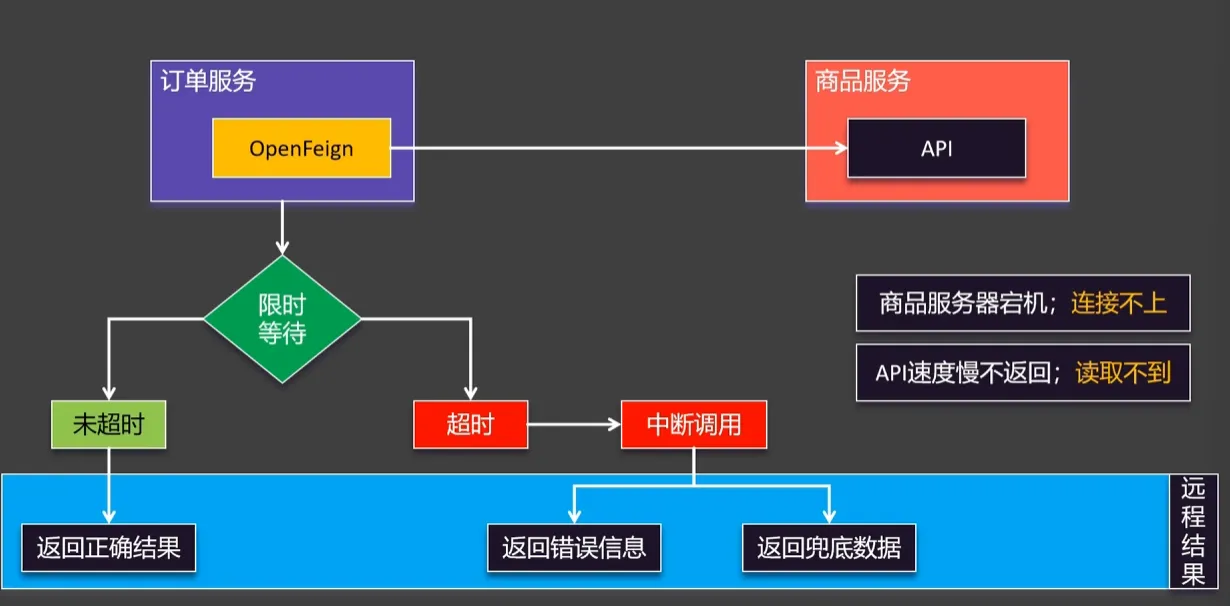
超时又分为连接超时和读取超时,默认为10s和60s
也可以自己设置
spring:
  cloud:
   openfeign:
    client:
      config:
        service-product:
          connect-timeout: 10000
          read-timeout: 15000
也可以将service-product服务id改为deault默认,这样默认用的就是deault设置的参数,对应服务配置了就用对应的参数
重试策略
远程调用失败后还可以继续进行尝试,但是默认配置时不重试
默认配置
service-product:
  connect-timeout: 10000
  read-timeout: 15000
  retryer: feign.retryer.Default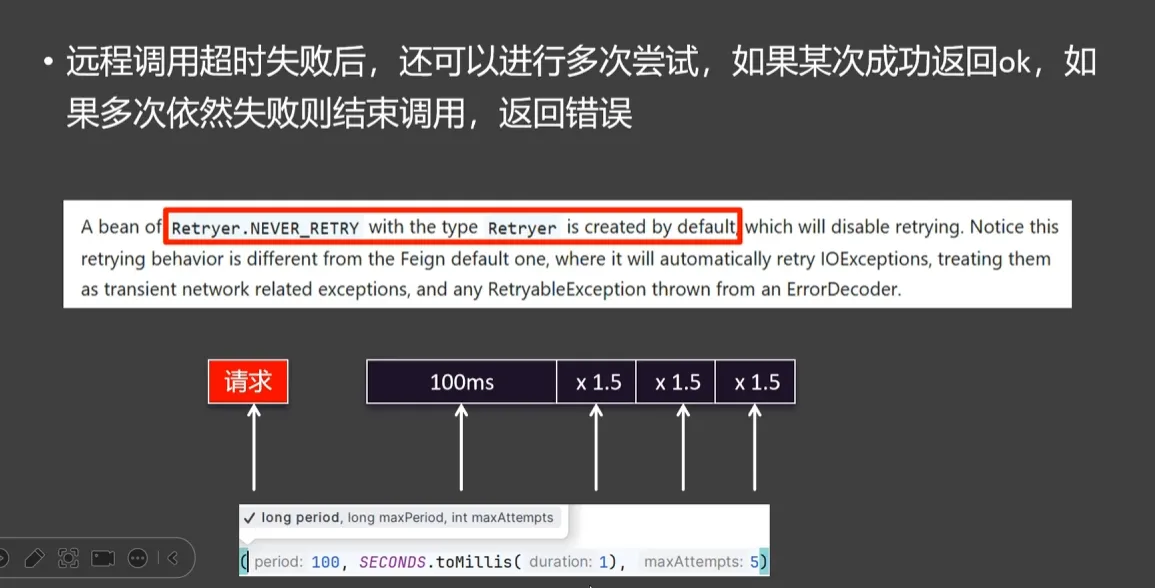
调用策略为间隔一段时间重试,每次重试*1.5倍,最大为1秒,最大重试次数为5
Bean配置
@Bean
Retryer retryer () {
    return new Retryer.Default();
}
配置拦截器
又分为请求拦截器和响应拦截器,日常主要使用到的是请求拦截器
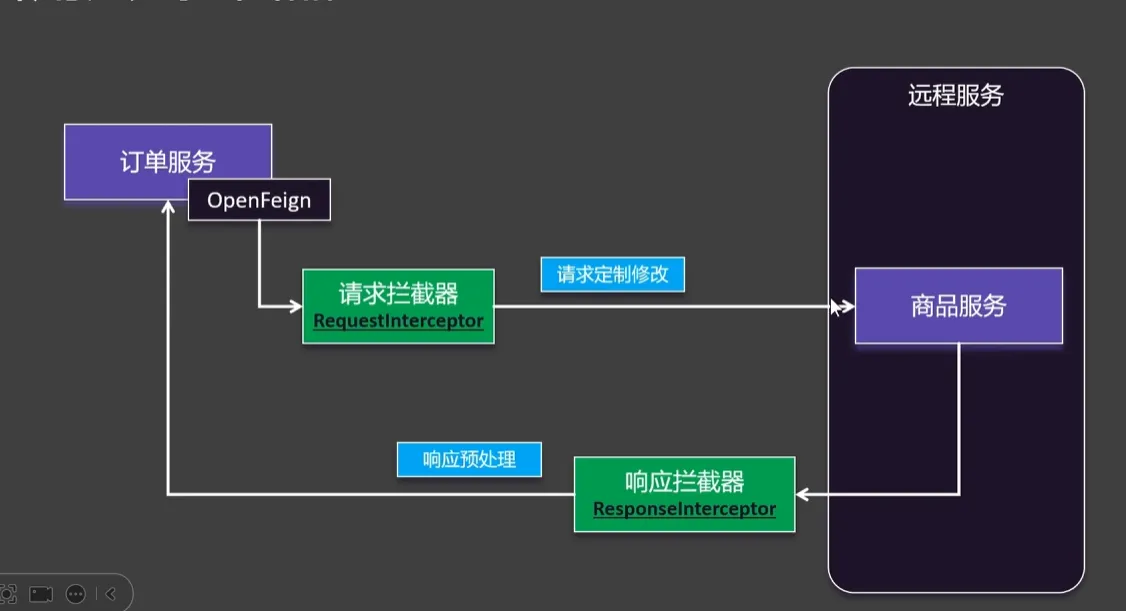
加上Component创建的请求拦截器,Cloud就会将其自动放在请求之前,用apply进行处理,例如这里添加上了一个X-Token
@Component
public class TokenRequestInterceptor implements RequestInterceptor {
    @Override
    public void apply(RequestTemplate requestTemplate) {
        System.out.println("启动了请求拦截器");
        requestTemplate.header("X-Token", UUID.randomUUID().toString());
    }
}
兜底结果
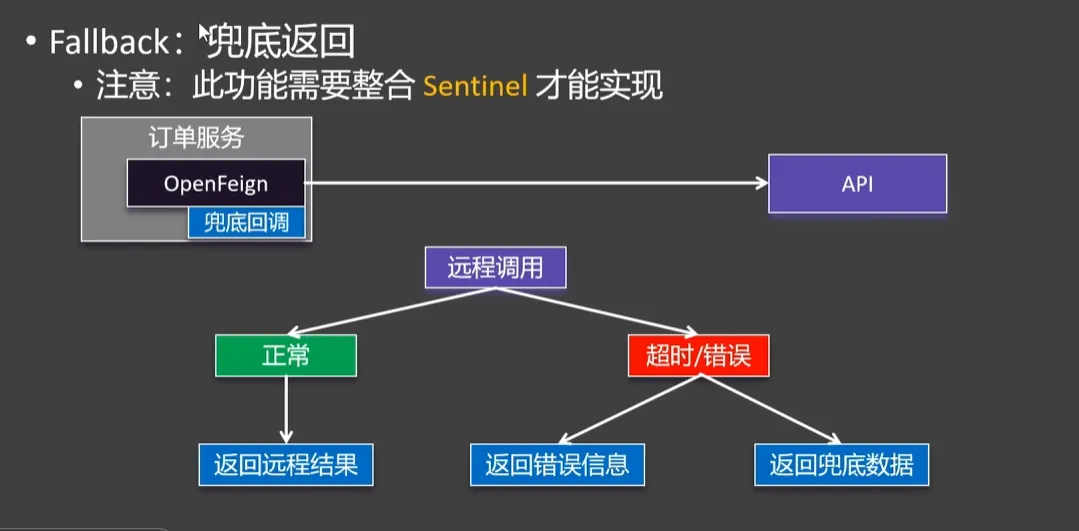
原先的远程服务OpenFeign接口
@FeignClient(value = "service-product")
public interface ProductFeignClient {

    @GetMapping("/product/{id}")
    public Product getProducts(@PathVariable int id);
}
FallBack只需要实现接口即可
@Component
public class ProductFallBack implements ProductFeignClient {
    @Override
    public Product getProducts(int id) {
        System.out.println("Falling back");
        Product product = new Product();
        product.setName("null");
        product.setPrice(0.0);
        return product;
    }
}
除此以外我们还要导入Sentinel依赖配置,并开启熔断功能
<dependency>
    <groupId>org.springframework.cloud</groupId>
    <artifactId>spring-cloud-starter-openfeign</artifactId>
</dependency>feign:
sentinel:
enabled: trueSentinel
服务保护(限流、熔断降级)
基本介绍
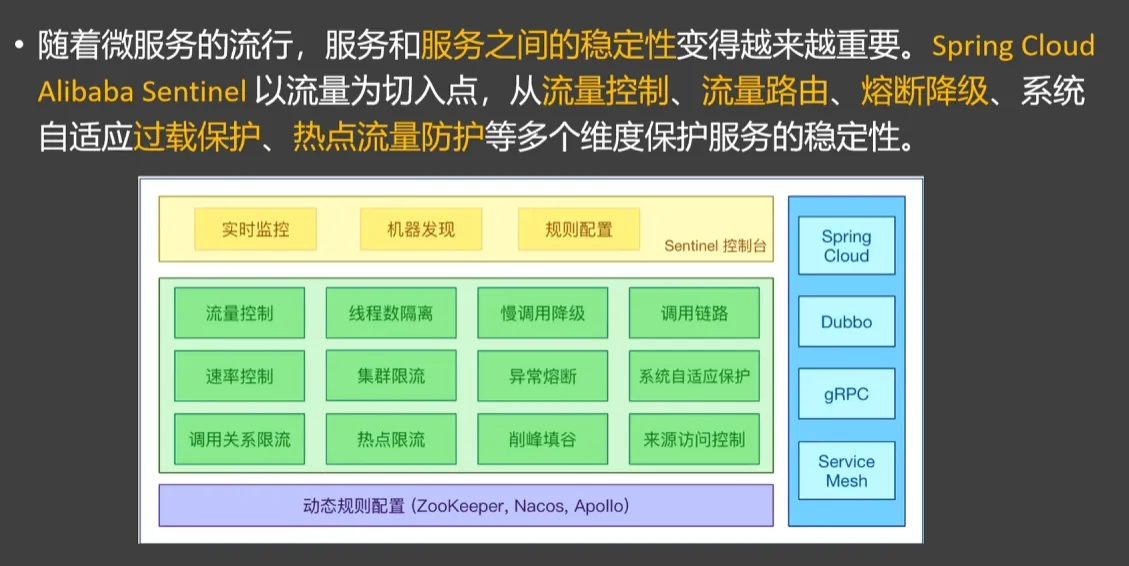
原理图
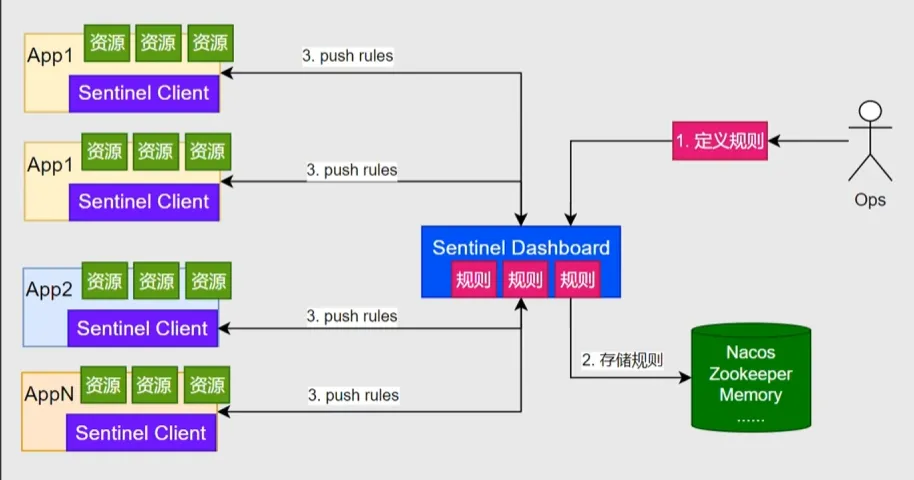
处理流程
基本使用
下载 sentinel-dashboard-1.8.8.jar ,java -jar启动
java -jar sentinel-dashboard-1.8.8.jar通过默认的8080端口访问
http://localhost:8080/默认账户密码都是setinel
引入sentinel依赖
<dependency>
    <groupId>com.alibaba.cloud</groupId>
    <artifactId>spring-cloud-starter-alibaba-sentinel</artifactId>
</dependency>
配置yaml配置:由于sentinel按需加载我们配置eager为true实现提前加载
spring:
  cloud:
    sentinel:
      transport:
        dashboard: localhost:8080
      eager: true
异常处理
在界面上新增限流策略QPS为1代表每秒只可以被访问一次,如果超出流量限制就会抛出BlockException的子类异常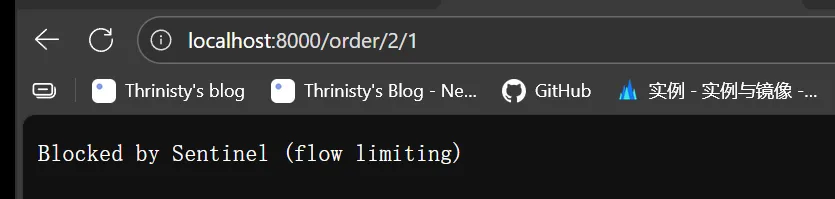
其中有五种异常分别对应五种规则
流量控制:FlowRule
熔断降级:DegradeRule
系统保护:SystemRule
来源访问控制:AuthorityRule
热点参数:RaramFlowRule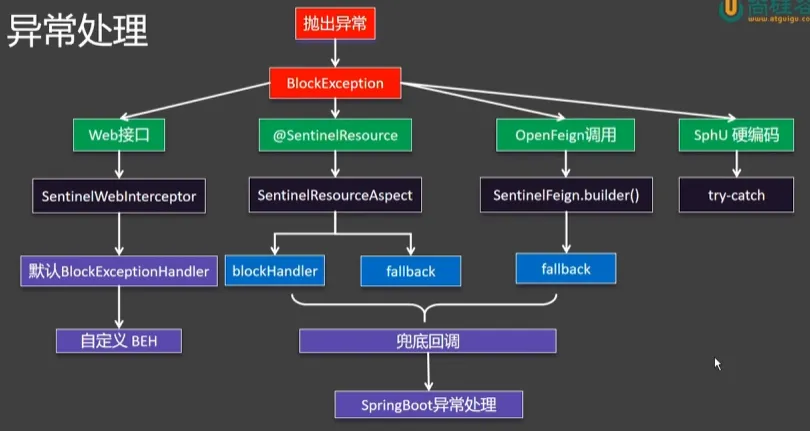
总体而言分为了四个部分Web接口,SentinelResource注解,OpenFeign远程调用,SphU硬编码
Web接口
在抛出BlockException异常后SpringBoot会帮我们利用默认的DefaultException进行处理并写入异常信息,但是在实际使用的时候我们需要的应该是覆盖默认的异常处理器,返回Json字符串用与前端的响应
@Component
public class MyBlockExceptionHandler implements BlockExceptionHandler {
    private ObjectMapper objectMapper = new ObjectMapper();

    @Override
    public void handle(HttpServletRequest request, HttpServletResponse response, String resourceName, BlockException e) throws Exception {
        PrintWriter writer = response.getWriter();
        response.setContentType("application/json;charset=utf-8");
        ResultVo<Object> fail = ResultVo.fail(500, e.getMessage());
        writer.write(objectMapper.writeValueAsString(fail));
    }
}
返回响应信息
{"code":500,"data":null,"message":"FlowException"}@SentinelResouce
对于被该注解标标注的资源在管理端会显示其Value名字
@SentinelResource(value = "createOrder")
@GetMapping("{userId}/{proId}")
public String order(@PathVariable int userId, @PathVariable int proId) {
    Product product = getProduct(proId);
    Order order = new Order();
    order.setUserId(userId);
    order.setPrice(product.getPrice());
    orderService.save(order);
    return order.toString();
}
如果我们对于他进行流量控制,超出预期后返回的是如下的结果,一个页面
Whitelabel Error Page
This application has no explicit mapping for /error, so you are seeing this as a fallback.

Tue Oct 14 20:10:26 CST 2025
There was an unexpected error (type=Internal Server Error, status=500).
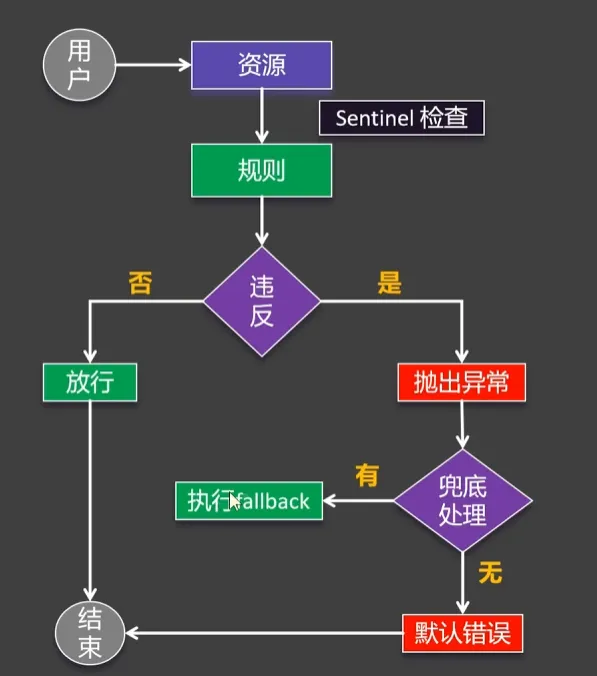
这是因为在Sentinel为了处理SentinelResouce资源运用AOP切入所有被SentinelResouce注解标注的资源,先拿到资源名称调用,并进行资源保护(根据规则决定继续执行还是抛出异常)
抛出异常后看有没有标注BlockHandler,标注了则交由Handler进行异常处理,如果标注fallback则走fallback兜底回调
如果两个都没有标注就调用DefaultFallBack抛出异常,上面的页面就是抛出的异常,在平时开发的时候会走全局异常处理器
解决方式:
所以,如果我们要对于这个异常进行自定义处理,就可以使用的是blockHandler指定处理方法(方法名和blockHandler指定的一致,参数一致,可以加BlockException),返回兜底的空数据
@SentinelResource(value = "createOrder", blockHandler = "createOrderFallBack")
@GetMapping("{userId}/{proId}")
public String order(@PathVariable int userId, @PathVariable int proId) {
    Product product = getProduct(proId);
    Order order = new Order();
    order.setUserId(userId);
    order.setPrice(product.getPrice());
    orderService.save(order);
    return order.toString();
}

public String createOrderFallBack(int userId, int proId, BlockException e) {
    return new Order().toString() + e.getClass().getSimpleName();
}
当然用全局处理也可以
远程调用
我们的Sentinel也可以对于远程被调用的服务进行规则处理,如果不满足规则,可以使用我们之前的OpenFeign超时时的兜底处理,如果没有被兜底处理,则交由全局进行处理
@FeignClient(value = "service-product", fallback = ProductFallBack.class)
public interface ProductFeignClient {
    @GetMapping("/product/{id}")
    Product getProducts(@PathVariable int id);
}@Component
public class ProductFallBack implements ProductFeignClient {
@Override
public Product getProducts(int id) {
System.out.println("Falling back");
Product product = new Product();
product.setName("null");
product.setPrice(0.0);
return product;
}
}SphU硬编码
如果我们需要对于一个代码段进行限流我们可以采用SphU.entry(“name”)的方式进行处理,将需要限流的代码段包括在try-catch中,并抛出BlockException异常,对于异常进行自定义处理即可
try {
    SphU.entry("SphU");
    url = "http://service-product/product/" + proId;
    System.out.println(url);
} catch (BlockException e) {
    System.out.println("相关处理以及抛出");
}
流控规则
FlowRule,限制多余的请求,从而保护了系统资源不被耗尽
流控规则细则
资源名:就是流控规则的名称
针对来源:对于需要限流的来源,Default代表从任何地方的请求都符合我们流控规则
阈值类型:限流的类型,分为QPS(底部采用的是计数器),并发线程数(采用的是线程池)
是否集群:如果集群可以设置单击均摊(对于单个机器计数)还有总体阈值
流控模式:默认为直接模式,其他还有链路策略和关联策略
直接模式:只针对对于目标资源进行流量控制,超过则限制,在范围内则正常执行
链路模式:我们有两个服务请求相同的资源,相对整个资源进行限流,子链路一个做限流一个不做限流
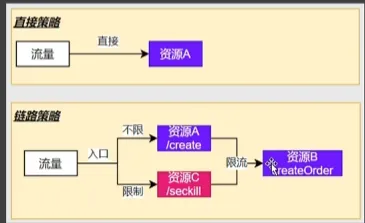
添加上将合并链路配置为false的配置,使得链路拆分
spring:
    cloud:
    sentinel:
      transport:
        dashboard: localhost:8080
      eager: true
      web-context-unify: false
拆分前: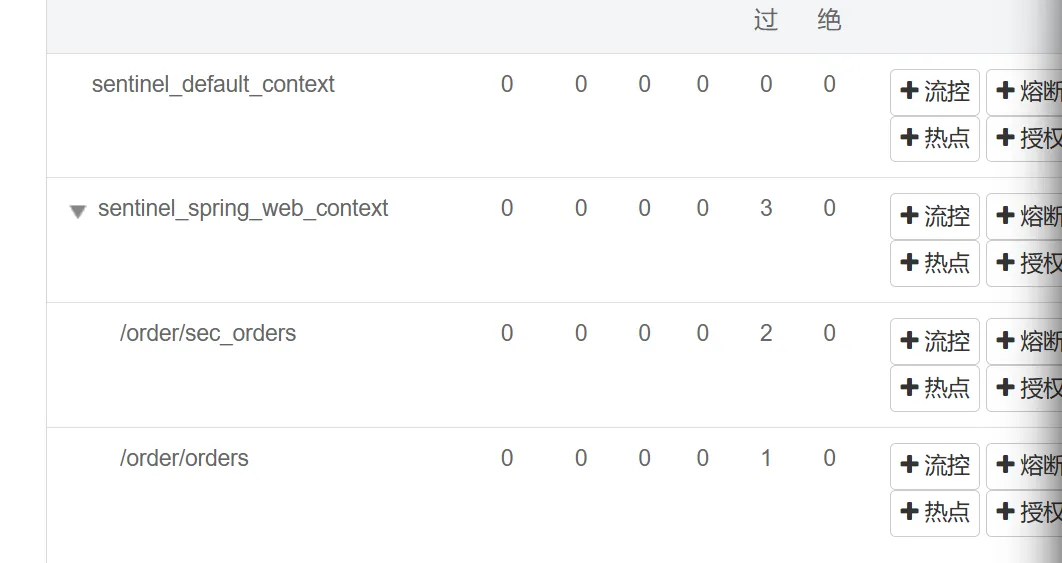
拆分后: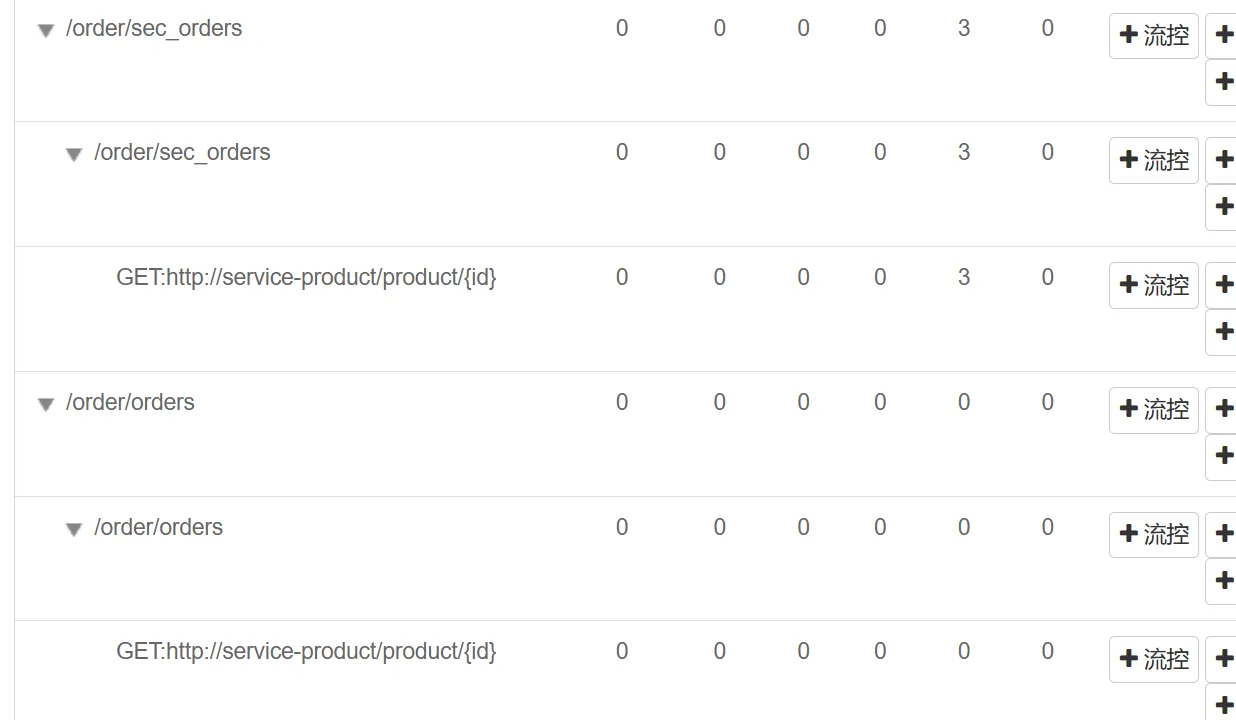
对需要限制流量的链路,对其公共的方法createOrder进行限流,入口资源选取需要流量控制的那个接口路径即可
关联规则
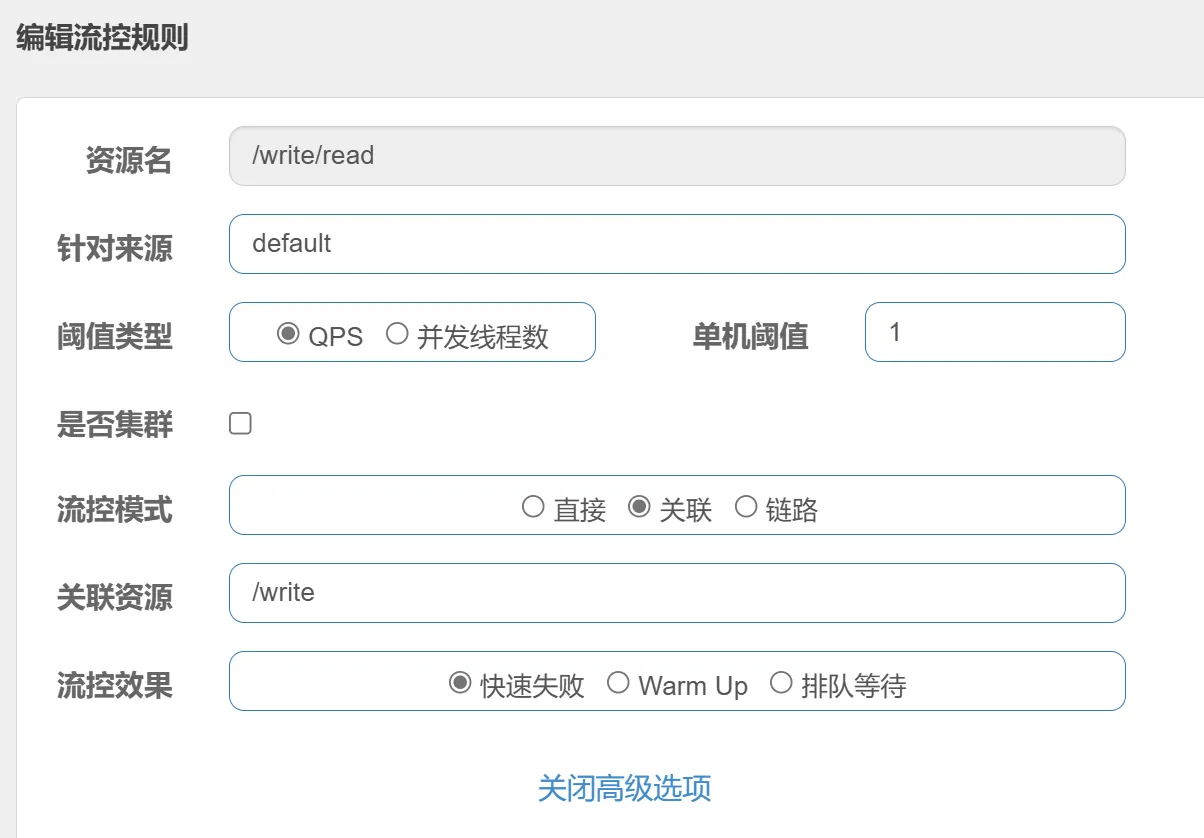
有的时候有这么一个场景,在一般的时候对于一个操作量少的时候,对于其相关联的操作不做任何限制,但是操作量上升的时候,我们就需要对关联的操作做限制
运用关联留空,设置关联资源,即可实现,当write流量大的时候,对read限流
流控效果
快速失败:设置QPS,多余则丢弃
Warm up:设置QPS和冷启动周期,会从三分之一QPS开始逐步增加
匀速排队:设置QPS和Timeout,多于请求排队等待处理,超出时间再丢弃(漏桶算法)
WARNING只有快速失败支持流控模式的设置,如果设置了流控规则不是快速失败,不支持链路关联
熔断规则
又被称为熔断降级,切断不稳定调用,快速返回请求不积压,避免服务的雪崩效应
作为保护自身的手段在调用端设置,及时切断远程调用。
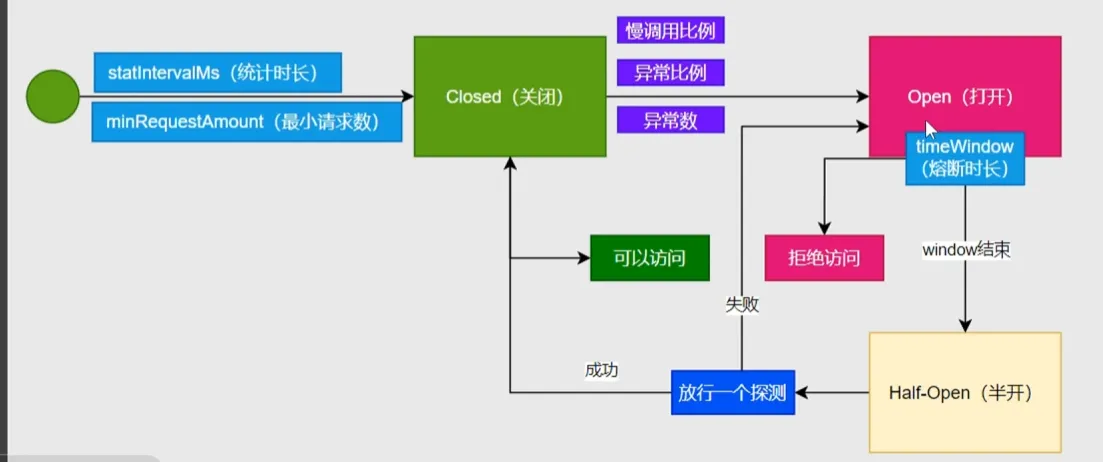
核心组件是断路器,默认为关闭,在调用接口出现问题的时候会将断路器打开,远程请求的时候会先走这一遍断路器,断路器打开了就会快速返回错误,而不是调用出问题的远程接口
配置熔断规则
慢调用比例
这里配置的是当请求时间超过1s是慢调用,当统计市场5s请求最少5的样本中有百分之80以上的满调用就启用5s的熔断
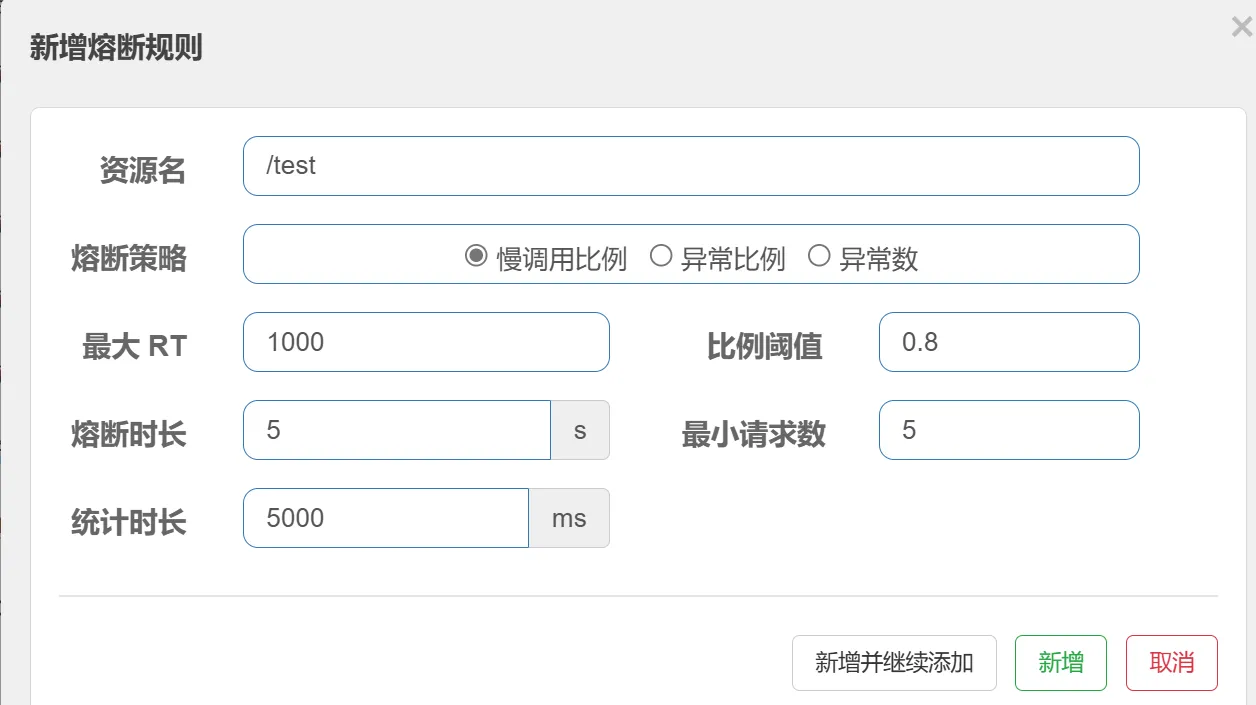
5s以后进入半开状态,尝试发送探测请求,如果请求顺畅则关闭断路器,否则继续熔断
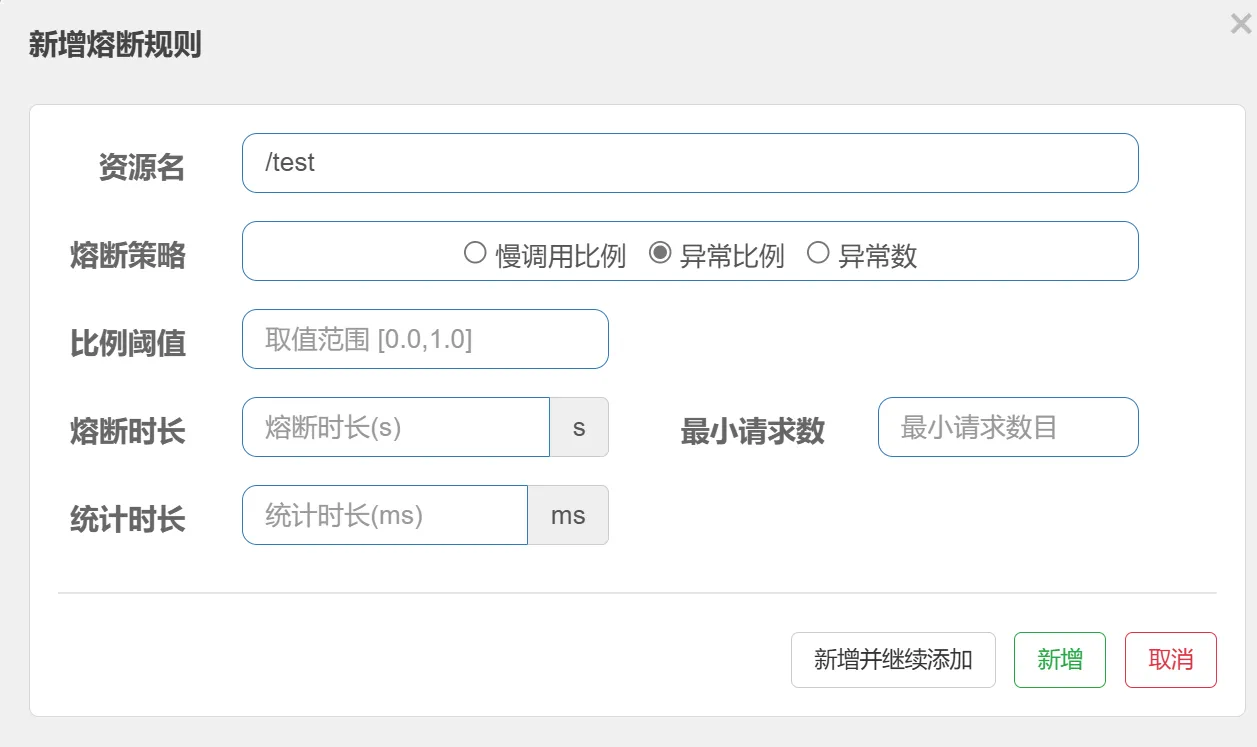
异常比例
当远程触发异常的时候,这个远程调用就是异常的调用,我们可以设置异常比例,当异常比例超过某一个阈值就会触发熔断
异常数
和异常比例类似,不管百分比,只要在规定时间异常数达到阈值就会触发熔断