

Spring笔记
AOP面向切面编程
AOP是一种编程技术,是对OOP的补充延申,底层采用动态代理实现,Spring AOP使用的动态代理是JDK动态代理 + CGLIB动态代理技术,Spring会在两者中切换
IoC使软件组件松耦合,AOP可以让你能够捕捉系统中经常使用的功能,把它转化为组件
一般一个系统当中都有一些系统服务,例如:日志,事务管理等称为交叉业务,切入核心代码中,在实现核心业务的时候不需要关系这些业务的实现
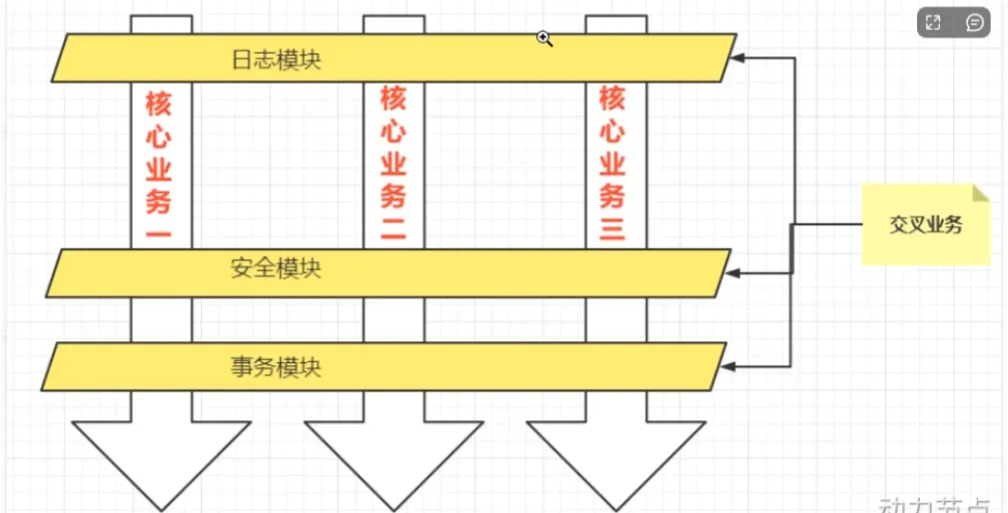
将于核心业务无关的代码独立提取出来,形成一个独立的组件,然后以横向交叉的方式运用到业务流程的过程中称之为AOP
NOTEAOP三大优点
- 代码复用性强
- 代码容易维护
- 使得开发者更加专注于业务逻辑
AOP七大术语
连接点 Joinpoint:在程序的整个执行流程中,可以织入切面的位置,方法执行前后,异常抛出之后等位置
切点 Pointcut:在程序执行流程中,真正织入切面的方法(一个切点对应多个连接点)
通知 Advice:通知又称为增强,就是具体你要织入的代码,包括了以下的五种通知:前置通知,后置通知,环绕通知,异常通知,最终通知
切面 Aspect:切点+通知即为切面
织入 Weaving:把通知应用到目标对象的过程
代理对象 Proxy:一个目标对象被织入通知后产生的新对象
目标对象 Target:被织入通知的对象
切点表达式
切点表达式用来定义通知往哪些方法切入
切入点表达式的语法格式
execution([访问权限] 返回值类型 [全限定类名]方法名(形参列表) [异常])访问权限:可选项,没写包括四个权限
返回类型:必填项,*表示任意类型
全限定类名:可选项,两个点”..”代表当前包以及子包下的所有类,省略表示所有类
方法名:必填项,表示所有方法,set表示所有的set方法
形参列表:必填项,()表示无参,(..)表示参数类型和个数随意,(*)表示一个参数方法
异常:可选项,省略时表示任意类型异常
代码示例
Service包下所有的类中以delete开始的所有方法
execution(public * com.service.*delete*(..))mall包下所有的类的所有方法
execution(* com.mail..*(..))所有类的所有方法
execution(* *(..))Spring AOP
AOP的实现
包括三种方式:
1.Spring框架结合AspectJ框架实现的AOP,基于注解方式
2.Spring框架结合AspectJ框架实现的AOP,基于XML方式
3.Spring框架自己实现的AOP,基于XML配置方式
在实际开发中,都是通过Spring + AspectJ实现AOP,重点掌握注解方式
使用方式
引入context依赖以及spring-aspects依赖
context默认有了,运用Maven添加spring-aspects依赖
<!-- Spring Boot Starter AOP (包含 Spring AOP 核心功能) -->
<dependency>
    <groupId>org.springframework.boot</groupId>
    <artifactId>spring-boot-starter-aop</artifactId>
</dependency>

<!-- AspectJ 注解支持(可选,如果需要 @AspectJ 风格的切面) -->
<dependency>
    <groupId>org.aspectj</groupId>
    <artifactId>aspectjweaver</artifactId>
    <version>1.9.7</version> <!-- 版本可调整 -->
</dependency>
在spring配置文件中引入命名空间
<?xml version="1.0" encoding="UTF-8"?>
<beans xmlns="http://www.springframework.org/schema/beans"
       xmlns:xsi="http://www.w3.org/2001/XMLSchema-instance"
       xmlns:context="http://www.springframework.org/schema/context"
       xmlns:aop="http://www.springframework.org/schema/aop"
       xsi:schemaLocation="http://www.springframework.org/schema/beans http://www.springframework.org/schema/beans/spring-beans.xsd
                           http://www.springframework.org/schema/context http://www.springframework.org/schema/context/spring-context.xsd
                           http://www.springframework.org/schema/aop http://www.springframework.org/schema/aop/spring-aop.xsd">
    <context:component-scan base-package="com.thrinisty.service"/>
</beans>
建立一个目标对象
package com.thrinisty.service;

import org.springframework.stereotype.Service;

@Service("userService")
public class UserService {
    //目标类
    public void login() {
        System.out.println("系统登录");
    }
}
建立一个代理对象
使用Aspect注解表名是代理对象,使用Before注解传入切点表达式
package com.thrinisty.service;

import org.aspectj.lang.annotation.Aspect;
import org.aspectj.lang.annotation.Before;
import org.springframework.stereotype.Component;

@Component("logAspect")
@Aspect
public class LogAspect {
    //切面 = 通知 + 切点
    @Before("execution(* com.thrinisty.service.UserService.*(..))")
    public void enhance() {
        System.out.println("一个通知,增强代码");
    }
}
spring配置
<?xml version="1.0" encoding="UTF-8"?>
<beans xmlns="http://www.springframework.org/schema/beans"
       xmlns:xsi="http://www.w3.org/2001/XMLSchema-instance"
       xmlns:context="http://www.springframework.org/schema/context"
       xmlns:aop="http://www.springframework.org/schema/aop"
       xsi:schemaLocation="http://www.springframework.org/schema/beans http://www.springframework.org/schema/beans/spring-beans.xsd
                           http://www.springframework.org/schema/context http://www.springframework.org/schema/context/spring-context.xsd
                           http://www.springframework.org/schema/aop http://www.springframework.org/schema/aop/spring-aop.xsd">
    <context:component-scan base-package="com.thrinisty.service"/>
    <aop:aspectj-autoproxy proxy-target-class="true"/>
</beans>
运用context扫描service包下的类,使用aop自动代理,并使代理默认使用CGLIB代理
测试程序
@Test
public void test() {
    ApplicationContext context = new ClassPathXmlApplicationContext("spring.xml");
    UserService userService = context.getBean("userService", UserService.class);
    userService.login();
}
一个通知,增强代码
系统登录在调用方法之前,调用了前置通知,完成了织入
通知类型
是具体你要织入的代码,包括了以下的五种通知:前置通知(Before),后置通知(AfterReturning),环绕通知(Around),异常通知(AfterThrowing),最终通知(After)
@Component("logAspect")
@Aspect
public class LogAspect {
    //切面 = 通知 + 切点
    @Before("execution(* com.thrinisty.service.OrderService.generate(..))")
    public void beforeAdvice() {
        System.out.println("前置通知");
    }

    @AfterReturning("execution(* com.thrinisty.service.OrderService.generate(..))")
    public void afterReturning() {
        System.out.println("后置通知");
    }

    @Around("execution(* com.thrinisty.service.OrderService.generate(..))")
    public void aroundAdvice(ProceedingJoinPoint joinPoint) throws Throwable {
        System.out.println("前环绕");
        joinPoint.proceed();//执行目标
        System.out.println("后环绕");
    }

    @After("execution(* com.thrinisty.service.OrderService.generate(..))")
    public void finalAdvice() {
        System.out.println("最终通知");
    }
}
执行顺序
前环绕
前置通知
生成订单
后置通知
最终通知
后环绕
我们在generate方法中抛出异常
@Service
public class OrderService {
    public void generate() {
        System.out.println("生成订单");
        throw new RuntimeException();
    }
}@AfterThrowing("execution(* com.thrinisty.service.OrderService.generate(..))")
public void afterThrowing() {
System.out.println("异常通知");
}前环绕
前置通知
生成订单
异常通知
最终通知后环绕和后置通知执行不到,在异常发生时异常通知,最终通知也正常
对于两个切面切入相同的的切点,可以通过@Order注解标注执行顺序,数字越小,优先级越高
@Aspect
@Component
@Order(0)//原先的设置为1
public class SecurityAspect {
    @Before("execution(* com.thrinisty.service.OrderService.generate(..))")
    public void beforeAdvice() {
        System.out.println("前置通知:安全");
    }
}
前置通知:安全
前环绕
前置通知
生成订单
后置通知
最终通知
后环绕通用切点
使用Pointcut注解可以复用一个切点
@Component("logAspect")
@Aspect
@Order(0)
public class LogAspect {

    @Pointcut("execution(* com.thrinisty.service.OrderService.generate(..))")
    public void universe() {

    }

    //切面 = 通知 + 切点
    @Before("universe()")
    public void beforeAdvice() {
        System.out.println("前置通知");
    }
......
}
跨类也可以使用
@Aspect
@Component
@Order(0)
public class SecurityAspect {
    @Before("com.thrinisty.service.LogAspect.universe()")
    public void beforeAdvice() {
        System.out.println("前置通知:安全");
    }
}
连接点
之前环绕通知使用过连接点 ProceedingJoinPoint joinPoint,作为参数传入
@Around("execution(* com.thrinisty.service.OrderService.generate(..))")
public void aroundAdvice(ProceedingJoinPoint joinPoint) throws Throwable {
    System.out.println("前环绕");
    joinPoint.proceed();//执行目标
    System.out.println("后环绕");
}
在其他的通知也可以传入,joinPoint有很多方法可供调用
@Before("universe()")
public void beforeAdvice(JoinPoint joinPoint) {
    System.out.println("前置通知");
    Signature signature = joinPoint.getSignature();//得到目标方法签名
    System.out.println(signature);
}
前置通知
void com.thrinisty.service.OrderService.generate()全注解开发
流行的开发方式,全注解开发,不使用注解
创建一个Config类对象,使用@Configuration标注,指定扫描包,使用代理
@Configuration
@ComponentScan({"com.thrinisty.service"})//扫描包
@EnableAspectJAutoProxy(proxyTargetClass = true)//启用代理,并使用CGLIB代理
public class Spring6Config {
}
测试文件,指定Config类对象
@Test
public void test2() {
    ApplicationContext context = new AnnotationConfigApplicationContext(Spring6Config.class);
    OrderService orderService = (OrderService) context.getBean("orderService");
    orderService.generate();
}
AOP实际运用
我们用事务处理来进行举例
对于一个核心的业务逻辑,st1 st2 st3,我们会在前后开启和关闭事务,保证代码全部提交或者全部回退,我们在这个时候可以采取AOP运用aroud注解利用环绕通知进行处理
一个转账操作对象,我们通过Aspect在其前后分别添加开始事务,提交事务,与捕获异常回滚事务的逻辑
@Service
public class AccountService {
    public void transfer() {
        System.out.println("系统正在完成转账操作...");
    }

    public void withdraw() {
        System.out.println("系统正在完成取款操作...");
        throw new RuntimeException();//模拟运行异常
    }
}
切面代码
@Component
@Aspect
public class TransactionAspect {
    @Around("execution(* com.service..*(..))")
    public void aroundAdvice(ProceedingJoinPoint joinPoint) throws Throwable {
        try{
            System.out.println("开启事务");
            //前环绕
            joinPoint.proceed();
            //后环绕
            System.out.println("提交事务");
        } catch (Throwable throwable) {
            System.out.println("回滚事务");
        }
    }
}
测试代码
 @Test
    public void test() {
        ApplicationContext context = new AnnotationConfigApplicationContext(Config.class);
        AccountService accountService = context.getBean("accountService", AccountService.class);
        accountService.transfer();
        accountService.withdraw();
    }
开启事务
系统正在完成转账操作...
提交事务
开启事务
系统正在完成取款操作...
回滚事务