

Java笔记
Math
Math类包含了执行基本数学运算的方法,如初等函数,对数,平方根,三角函数
常用的方法
abs求绝对值
public class Math01 {
    public static void main(String[] args) {
        System.out.println(Math.abs(-123));//123
    }
}
pow求幂
public class Math01 {
    public static void main(String[] args) {
        System.out.println(Math.pow(2, 4));//16.0
    }
}
ceil向上取整
返回大于等于这个数的最小整数
public class Math01 {
    public static void main(String[] args) {
        System.out.println(Math.ceil(20.2));//21.0
    }
}
floor向上取整
返回小于等于这个数的最大整数
public class Math01 {
    public static void main(String[] args) {
        System.out.println(Math.floor(20.2));//20.0
    }
}
round四舍五入
public class Math01 {
    public static void main(String[] args) {
        System.out.println(Math.round(20.35));//20.0
    }
}
sqrt开方
public class Math01 {
    public static void main(String[] args) {
        System.out.println(Math.sqrt(9));//3.0
    }
}
random随机数
返回一个[0,1)之间的随机小数
public class Math01 {
    public static void main(String[] args) {
        System.out.println(Math.random());//0.8490844298476015
    }
}
2-7之间的随机整数
public class Math01 {
    public static void main(String[] args) {
        //Math.random() * x 返回了一个数[0, x)
        //Math.random() * 5 返回了[0, 5),
        System.out.println(Math.random() * 5 + 2);//[2,7)
        System.out.println((int)(Math.random() * 6 + 2));//2-7的整数
    }
}
max和min
public class Math01 {
    public static void main(String[] args) {
        System.out.println(Math.max(1, 2));//2
        System.out.println(Math.min(1, 2));//1
    }
}
Arrays
包含了一系列的静态方法,用于管理和操作数组(例如排序和搜索)
常用方法
toString方法
返回一个字符串
public class Arrays01 {
    public static void main(String[] args) {
        Integer[] arr = {1, 2, 3, 4, 5, 6, 7, 8, 9, 10};
        System.out.println(Arrays.toString(arr));
        //[1, 2, 3, 4, 5, 6, 7, 8, 9, 10]
    }
}
sort排序
public class Arrays01 {
    public static void main(String[] args) {
        Integer[] arr = {2, 1, 3, 8, 5, 6, 7, 4, 10, 9};
        Arrays.sort(arr);
        System.out.println(Arrays.toString(arr));
        //[1, 2, 3, 4, 5, 6, 7, 8, 9, 10]
    }
}
binarySearch二分查找
要求排序,找不到返回-(low + 1),表示如果存在应该在的地方
public class Arrays01 {
    public static void main(String[] args) {
        int[] arr = {1, 2, 3, 4, 5, 6, 7, 8, 9};
        System.out.println(Arrays.binarySearch(arr, 5));//4
        System.out.println(Arrays.binarySearch(arr, 15));//-10
    }
}
copyOf拷贝数组
拷贝arr的3个数,如果长度大于arr的length,多的int用0填充,Integer用null填充
public class Arrays01 {
    public static void main(String[] args) {
        int[] arr = {1, 2, 3, 4, 5, 6, 7, 8, 9};
        int[] arrNew = Arrays.copyOf(arr, 3);
        System.out.println(Arrays.toString(arrNew));//[1, 2, 3]
    }
}
public class Arrays01 {
public static void main(String[] args) {
Integer[] arr = {1, 2, 3, 4, 5, 6, 7, 8, 9};
Integer[] arrNew = Arrays.copyOf(arr, 11);
System.out.println(Arrays.toString(arrNew));
//[1, 2, 3, 4, 5, 6, 7, 8, 9, null, null]
}
}fill数组填充
用后面的数填充整个数组
public class Arrays01 {
    public static void main(String[] args) {
        Integer[] arr = {1, 2, 3};
        Arrays.fill(arr, 4);
        System.out.println(Arrays.toString(arr));//[4, 4, 4]
    }
}
equals比较数组元素
注意与直接使用arr.equals(arr2)区分
public class Arrays01 {
    public static void main(String[] args) {
        Integer[] arr = {1, 2, 3};
        Integer[] arr2 = {1, 2, 3};
        System.out.println(Arrays.equals(arr, arr2));//true
    }
}
asList将一组值转为list
将数组转为一个asList集合
public class Arrays01 {
    public static void main(String[] args) {
        Integer[] arr = {1, 2, 3};
        List asList = Arrays.asList(arr);
    }
}
定制排序及其底层实现
额外的,我们可以传入一个匿名内部类,定制排序
匿名内部类,动态绑定,接口编程的组合可以在编程的时候变得非常灵活
public class Arrays01 {
    public static void main(String[] args) {
        Integer[] arr = {2, 1, 3, 8, 5, 6, 7, 4, 10, 9};
        Arrays.sort(arr, new Comparator() {
            @Override
            public int compare(Object o1, Object o2) {
                Integer i1 = (Integer) o1;
                Integer i2 = (Integer) o2;
                return i2 - i1;
            }
        });
        System.out.println(Arrays.toString(arr));
        [10, 9, 8, 7, 6, 5, 4, 3, 2, 1]
    }
}
在底层的代码中会执行我们实现的匿名内部类,从而影响内部逻辑,改变排序顺序(有兴趣的可以通过断点调试去试一试)
public static <T> void sort(T[] a, Comparator<? super T> c)… 这里省略了一些调用过程,下面是类c的使用
while (left < right) {
    int mid = (left + right) >>> 1;
    if (c.compare(pivot, a[mid]) < 0)//这里的c就是我们实现接口的类
        right = mid;
    else
        left = mid + 1;
}
assert left == right;
模拟底层排序
我们也可以自己来模拟以下底层的排序,以下是以往的自定义方法
public class Arrays01 {
    public static void main(String[] args) {
        int[] arr = {2, 1, 3, 8, 5, 6, 7, 4, 10, 9};
        bubbleSort(arr);
        System.out.println(Arrays.toString(arr));
    }

    public static void bubbleSort(int[] a) {
        for(int i = 0; i < a.length - 1; i++) {
            for(int j = 0; j < a.length - i - 1; j++) {
                if(a[j] > a[j + 1]) {
                    int temp = a[j];
                    a[j] = a[j + 1];
                    a[j + 1] = temp;
                }
            }
        }
    }
}
实现定制排序
public class Arrays01 {
    public static void main(String[] args) {
        int[] arr = {2, 1, 3, 8, 5, 6, 7, 4, 10, 9};
        bubbleSort(arr, new Comparator() {
            public int compare(Object o1, Object o2) {
                int i1 = (Integer)o1;
                int i2 = (Integer)o2;
                return i2 - i1;
            }
        });
        System.out.println(Arrays.toString(arr));
    }

    public static void bubbleSort(int[] a, Comparator c) {
        for (int i = 0; i < a.length - 1; i++) {
            for (int j = 0; j < a.length - i - 1; j++) {
                if (c.compare(a[j], a[j + 1]) > 0) {
                    int temp = a[j];
                    a[j] = a[j + 1];
                    a[j + 1] = temp;
                }
            }
        }
    }
}
其实一般限定的也比较死,都是i2 - i1是从大到小,反之亦然
一个书本排序的案例(按照价格从大到小)
public class Arrays01 {
    public static void main(String[] args) {
        Book[] books = new Book[4];
        books[0] = new Book("爱丽丝", 1);
        books[1] = new Book("齐欢乐", 12);
        books[2] = new Book("英雄联盟", 123);
        books[3] = new Book("王者荣耀", 14);
        System.out.println("排序前");
        printBooks(books);
        Arrays.sort(books, new Comparator() {
            public int compare(Object o1, Object o2) {
                Book b1 = (Book) o1;
                Book b2 = (Book) o2;
                return b2.price - b1.price;
            }
        });
        System.out.println("排序后");
        printBooks(books);
    }

    public static void printBooks(Book[] books) {
        for (Book book : books) {
            System.out.println(book.price + " " + book.name);
        }
    }
}
class Book {
    String name;
    int price;

    public Book(String name, int price) {
        this.name = name;
        this.price = price;
    }
}
按照名字长度从大到小,自定义排序用匿名类重写compare即可
因为sort传入的是泛型,我们只需要重写接口的compare方法改为我们需要使用到的排序属性做一个相减比较即可实现类数组的排序
Arrays.sort(books, new Comparator() {
    public int compare(Object o1, Object o2) {
        Book b1 = (Book) o1;
        Book b2 = (Book) o2;
        return b2.name.length() - b1.name.length();
    }
});
System
System常见的方法
exit
退出当前程序
public class System01 {
    public static void main(String[] args) {
        System.exit(0);//程序退出,0代表正常退出
        System.out.println("continue...");
    }
}
arraycopy
复制数组元素copyOf调用的底层就是这个方法
Arrays中的
第一个参数表示拷贝源,第二个为源开始拷贝的下表 第三个参数表示拷贝目标,第四个为源开始复制的下表 第五个表示拷贝的长度
public class System01 {
    public static void main(String[] args) {
        int[] src = {1, 3, 4};
        int[] newSrc = new int[src.length];
        System.arraycopy(src, 0, newSrc, 1, 2);
        System.out.println(Arrays.toString(newSrc));
        //[0, 1, 3]
    }
}
currentTimeMillens
返回当前时间距离1970-1-1的毫秒数
public class System01 {
    public static void main(String[] args) {
        System.out.println(System.currentTimeMillis());
        //1743413461175
    }
}
gc
运行垃圾回收机制(非阻塞)
public class Hashcode {
    public static void main(String[] args) {
        AA aa = new AA();
        aa = null;
        System.gc();//主动调用回收器
        System.out.println("代码结束");
    }
}
大数处理
BigInteger
比较适合保存较大的整形
public class BigInteger_ {
    public static void main(String[] args) {
        BigInteger biginteger = new BigInteger("1234567893242342235233253532532");
        System.out.println(biginteger);
    }
}
在进行BigInteger的加减乘除的时候需要使用对应方法(加减乘除)
add
public class BigInteger_ {
    public static void main(String[] args) {
        BigInteger biginteger = new BigInteger("1234567893242342235233253532532");
        biginteger = biginteger.add(biginteger);
        System.out.println(biginteger);
    }
}
subtract
public class BigInteger_ {
    public static void main(String[] args) {
        BigInteger biginteger = new BigInteger("1234567893242342235233253532532");
        biginteger = biginteger.subtract(biginteger);
        System.out.println(biginteger);
    }
}
divide
public class BigInteger_ {
    public static void main(String[] args) {
        BigInteger biginteger = new BigInteger("1234567893242342235233253532532");
        biginteger = biginteger.divide(biginteger);
        System.out.println(biginteger);
    }
}
multiply
public class BigInteger_ {
    public static void main(String[] args) {
        BigInteger biginteger = new BigInteger("1234567893242342235233253532532");
        biginteger = biginteger.multiply(BigInteger.valueOf(2));
        System.out.println(biginteger);
    }
}
BigDecimal
适合保存精度更高的浮点型(小数)
方法同理
public class BigInteger_ {
    public static void main(String[] args) {
        BigDecimal big = new BigDecimal("1.0000003982039023029309239203992032093");
        BigDecimal big2 = new BigDecimal("121.333");
        big = big.add(big2);
        System.out.println(big);
    }
}
在作除法的时候可能会抛出除不尽的异常
可以通过以下调用divide方法时指定精度
public class BigInteger_ {
    public static void main(String[] args) {
        BigDecimal big = new BigDecimal("1.0000003982039023029309239203992032093");
        BigDecimal big2 = new BigDecimal("121.333");
        big = big.divide(big2, BigDecimal.ROUND_CEILING);
        //保留分子精度
        System.out.println(big);
    }
}
日期类
Date
第一代日期类:精确到毫秒,代表特定时间,实现了比较接口,克隆接口,可序列化接口
public class Date
    implements java.io.Serializable, Cloneable, Comparable<Date>
{ ......
构造方法
Date无参构造器,获取当前系统时间
public class Date01 {
    public static void main(String[] args) {
        Date d1 = new Date();//获取当前系统时间
        System.out.println(d1);//默认为外国时间格式,需要转换
        //Mon Mar 31 19:56:05 CST 2025
    }
}
Date构造器传入一个long型的数(毫秒数),转为Date型
public class Date01 {
    public static void main(String[] args) {
        Date d1 = new Date(1341324134);
        SimpleDateFormat sdf = new SimpleDateFormat("yyyy年MM月dd日 || hh:mm:ss");
        System.out.println(sdf.format(d1));
        //1970年01月16日 || 08:35:24
    }
}
SimpleDateFormat
格式和解析日期的类
先定义一个日期的格式,创建sdf对象
SimpleDateFormat sdf = new SimpleDateFormat("yyyy年MM月dd日");按照对应格式输出时间
public class Date01 {
    public static void main(String[] args) {
        Date d1 = new Date();
        SimpleDateFormat sdf = new SimpleDateFormat("yyyy年MM月dd日 || hh:mm:ss");
        System.out.println(sdf.format(d1));
        //2025年03月31日 || 07:58:20
    }
}
将Date格式化日期转为Date
public class Date01 {
    public static void main(String[] args) throws ParseException {
        SimpleDateFormat sdf = new SimpleDateFormat("yyyy年MM月dd日 || hh:mm:ss");
        Date d1 = sdf.parse("1970年01月16日 || 08:35:24");
        //需要日期格式对应,否则抛出异常
        System.out.println(d1);
        //Fri Jan 16 08:35:24 CST 1970
    }
}
Calendar
日历:第二代日期类,是一个抽象类
public abstract class Calendar implements Serializable, Cloneable, Comparable<Calendar> {...该类的构造器添加了private无法手动创建实例
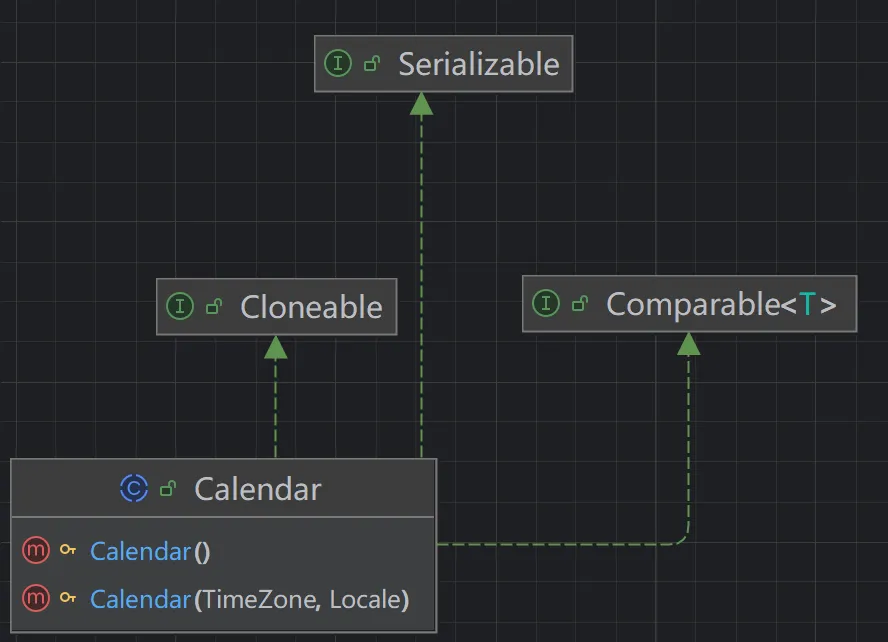
通过getInstance获取实例
public class Calendar01 {
    public static void main(String[] args) {
        Calendar cal = Calendar.getInstance();
        System.out.println(cal.get(Calendar.YEAR));
        //2025
        System.out.println(cal.get(Calendar.MONTH) + 1);
        //3 月份需要+1,因为是由0开始编码
    }
}
没有格式化输出方法,可以由自己自由定义,以下是一个代码示例
public class Calendar01 {
    public static void main(String[] args) {
        Calendar cal = Calendar.getInstance();
        System.out.println(formatPrint(cal));
        //2025-2-31 20:21:58
    }

    public static String formatPrint(Calendar cal) {
        int year = cal.get(Calendar.YEAR);
        int month = cal.get(Calendar.MONTH);
        int day = cal.get(Calendar.DAY_OF_MONTH);
        int hour = cal.get(Calendar.HOUR_OF_DAY);//24进制
        //12进制位HOUR
        int minute = cal.get(Calendar.MINUTE);
        int second = cal.get(Calendar.SECOND);
        return year + "-" + month + "-" + day + " " + hour + ":" + minute + ":" + second;
    }
}
第三代日期类
引入原因
是由于前两代的不足引入的
Date大多数方法在JDK1.1之后就被弃用了
而Calendar类也存在一下问题
可变性:日期和时间的类应该是不可变的
偏移性:Date中的年份是从1900开始的,而月份是从0开始的
格式化:格式化只对Date有用,Calendar不行
线程安全:两者都不是线程安全的;同时不能处理闰秒(每隔2天,多1s)
第三代日期的常见的使用
LocalDate
只包含日期,可以获取日期字段
public class Local01 {
    public static void main(String[] args) {
        LocalDate ldt = LocalDate.now();
        System.out.println(ldt);//2025-03-31
    }
}
LocalTime
只包含时间,可以获取时间字段
public class Local01 {
    public static void main(String[] args) {
        LocalTime ldt = LocalTime.now();
        System.out.println(ldt);//20:34:32.321
    }
}
LocalDateTime
包含日期、时间
public class Local01 {
    public static void main(String[] args) {
        LocalDateTime ldt = LocalDateTime.now();
        System.out.println(ldt);//2025-03-31T20:33:20.585
    }
}
常见的方法
即查即用即可,以下是一个自定义格式代码示例
public class Local01 {
    public static void main(String[] args) {
        LocalDateTime ldt = LocalDateTime.now();
        System.out.println(formatPrint(ldt));//2025-3-31
    }

    public static String formatPrint(LocalDateTime ldt) {
        int year = ldt.getYear();
        int month = ldt.getMonthValue();
        int day = ldt.getDayOfMonth();
        return year + "-" + month + "-" + day ;
    }
}
或者我们可以使用DateTimeFormatter来定义
类似于Date中的SimpleDateFormat
public class Local01 {
    public static void main(String[] args) {
        LocalDateTime d1 = LocalDateTime.now();
        DateTimeFormatter formatter = DateTimeFormatter.ofPattern("MM-dd-yyyy");
        System.out.println(d1.format(formatter));
        //03-31-2025
    }
}
比较,前一个传入的参数是格式器,后一个传入的是日期类
public class Date01 {
    public static void main(String[] args) {
        Date d1 = new Date();
        SimpleDateFormat sdf = new SimpleDateFormat("yyyy年MM月dd日 || hh:mm:ss");
        System.out.println(sdf.format(d1));
        //2025年03月31日 || 07:58:20
    }
}
时间戳与Date的转换
public class Local01 {
    public static void main(String[] args) {
        Instant instant = Instant.now();//通过now获取时间戳
        System.out.println(instant);//2025-03-31T12:47:34.897Z
        Date date = Date.from(instant);//将时间戳转为Date
        instant = date.toInstant();//将Date转为时间戳
    }
}
时间计算
在做订单的时候比较常用
可以使用plus和minus方法可以对当前时间进行加或者减
public class Local01 {
    public static void main(String[] args) {
        LocalDateTime localDateTime = LocalDateTime.now();
        System.out.println(localDateTime.minusMonths(1));
        //2025-03-30T20:53:15.177
    }
}